Receive e-invoices and prepare them for accounting

Bring incoming invoices together in one place. Find original documents and attachments, review them as needed and provide files to your accounting team or tax adviser.

What Rechnungscockpit does for your team

Document icon showing detected invoice data

Invoice recognition and filing

Rechnungscockpit automatically extracts data from supported XRechnung and ZUGFeRD formats. Originals and attachments stay together. A verified storage profile and documented procedures support retention under Germany’s GoBD rules.

Icon showing an invoice routed for approval

Digital workflows

With Business, review invoice data and add details such as cost centres. With Business Pro, assign invoices to team members for approval. Authorised users can see progress and decisions in the invoice history.

Icon showing an original document download

Handover to accounting

Download original documents for your accounting team or tax adviser. You can then upload supported files to your accounting system.

Four steps from inbox to accounting

  1. Receive

    Import invoices from Exchange in Microsoft 365, IMAP or a file upload. When enabled, Exchange can show the Outlook category “RC: Importiert”.

  2. Capture and retain

    Read supported XRechnung and ZUGFeRD data by processing profile and assign it to the document. A verified storage profile supports retention under GoBD.

  3. Review and approve

    Business adds OCR for scanned PDFs and invoice review. Business Pro can include a second account for approval.

  4. Retrieve and transfer

    Download the files for accounting or your tax adviser. Direct accounting integrations are optional and can be tailored to your needs.

From invoice receipt to accounting

Capture XRechnung and ZUGFeRD, retain originals, review with Business or approve with Business Pro. Optional Outlook categorisation. Download accounting files today. Direct accounting integrations are optional and can be tailored to your needs.Open full-size workflow diagram

Structured e-invoices, PDFs and scans

Rechnungscockpit reads supported XRechnung and ZUGFeRD profiles. You can also import ordinary PDFs and scans as incoming documents. Business adds OCR for image-based invoices.

Federal Ministry of Finance FAQ on e-invoicing

Keep the original and record each step

  1. Originals and attachments

    The original file and associated attachments stay assigned to the organisation from the moment they are captured.

  2. Separate processing states

    With Business and above, review invoice data and add details such as suppliers or cost centres. The original file is retained separately from these changes.

  3. Protection during retention

    A verified storage profile protects originals from alteration for the applicable retention period. GoBD retention also depends on the organisation’s documented procedure.

GoBD guidance from the Federal Ministry of Finance

Provide original documents for accounting

Download original documents from Rechnungscockpit. Your accounting team or tax adviser can upload supported files to DATEV, Lexware Office or sevdesk and post them there.

SharePoint can serve as an export or synchronisation destination. A qualified document management system or NAS can be configured separately for archiving.

Packages and pricing

Monthly prices per customer account and a one-time setup fee. Storage is charged separately. All prices exclude VAT.

Starter · €29/month

€149 one-time setup. Capture and retrieve incoming documents for one organisation. Includes one mailbox, file uploads, extraction from supported XML and embedded PDF text, and storage of originals. Setup includes connecting the mailbox and a test import.

Business · €49/month

€390 one-time setup. Everything in Starter plus OCR, editable invoice data, master data suggestions and review sign-off. For one organisation. Also manage invoices that have already been issued. Additional mailboxes are optional. Setup includes review configuration and introductory training.

Business Pro · €89/month

€790 one-time setup. Everything in Business plus internal approvals, returns, deputies and an optional second approver. Separate access and a consolidated view for authorised users. Standard offer for up to three organisations, with one approval workflow configured.

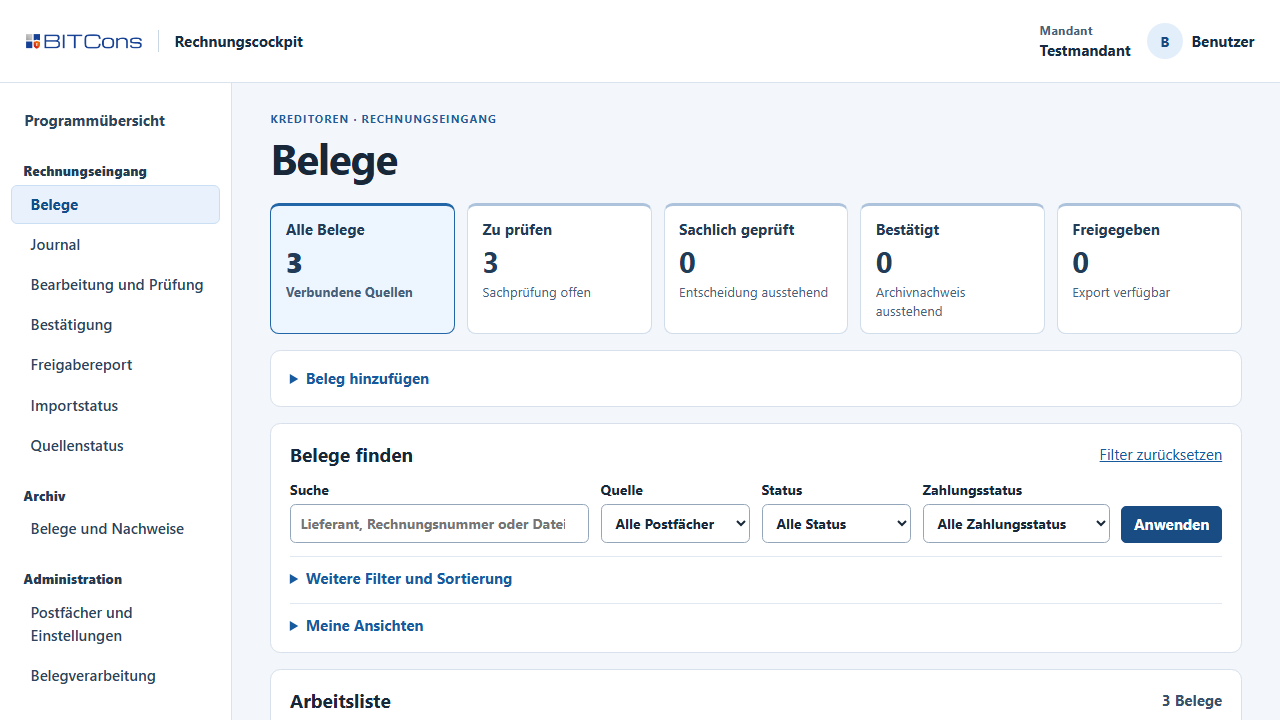
Inside the application.

Invoice overview and filtering in the actual application, shown with sample data.

Rechnungscockpit invoice overview with sample dataOpen the app

See Rechnungscockpit in a personal demo

Tell us how you receive invoices today. We will show you a workflow for your team.

Request a Rechnungscockpit demo